Adding or Updating Your BIM Contributor Profile
The information you enter to complete your BIM Contributor profile will also be used to create your Press Badge.
Guidelines
- NO Authority Marketing pitches in your bio.
- NO Authority Marketing calls to action in your bio.
- Only one Contributor Profile per login is permitted.
- NO logos or text in your contributor profile image.
From the Contributor Dashboard on BusinessInnovatorsMagazine.com, select the Contributor Profile link:
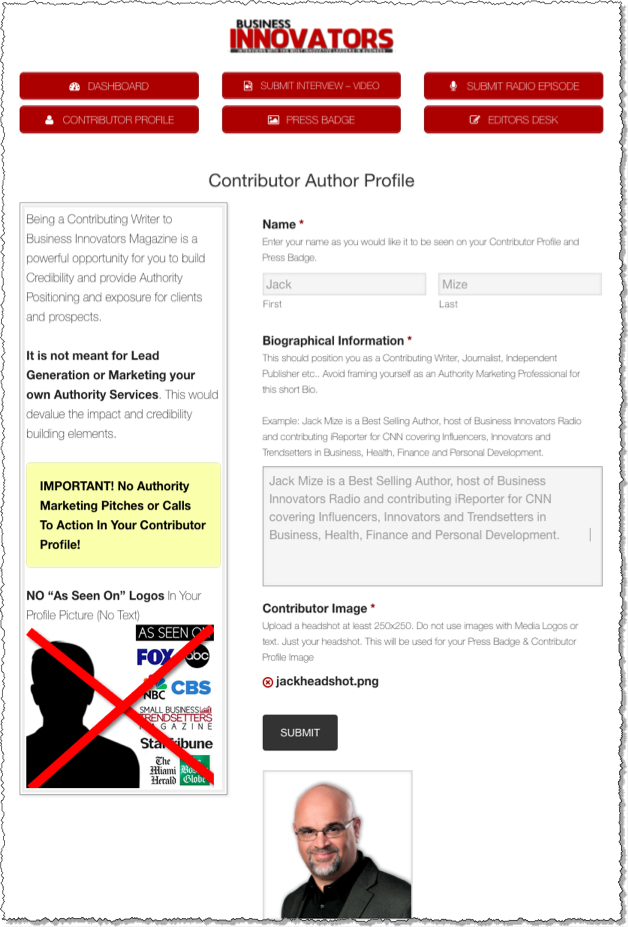
From here you will be able to update your Contributor Profile with the following information:
First Name and Last Name
List your name exactly as you want it to appear on your articles or Press Badge.
Biographical Information
This should position you as a Contributing Writer, Journalist, Independent Publisher, etc. Avoid framing yourself as an Authority Marketing Professional for this short Bio.
Example: Jack Mize is a Best Selling Author, host of Business Innovators Radio and contributor to Small Business Trendsetters and Business Innovators Magazine covering Influencers, Innovators and Trendsetters in Business, Health, Finance and Personal Development.
Contributor Image
Upload a headshot at least 250×250. Do not use images with Media Logos or text.
Submit
Click Submit to save your changes.
Updates
You can update the information from your Contributor Profile at any time.