Submitting an Interview with a YouTube Video to Business Innovators Magazine
IMPORTANT GUIDELINES!
- Business Innovators Magazine Video and Written Interviews MUST be created and owned by you. Do NOT embed random video interviews.
- No Pitching Authority Marketing Services
- No Hype Filled Promotional / Sales Page Posts or Videos
- Keep Language Clean
- Videos must be Youtube links
Submitting Video Interviews
1. Login to your account on BusinessInnovatorsMagazine.com
2. From the Contributor Dashboard, select Submit Interview -Video

1. Add the Title
2. Add the Article Summary
3. Paste the YouTube Share Link*
4. Add a call to Action
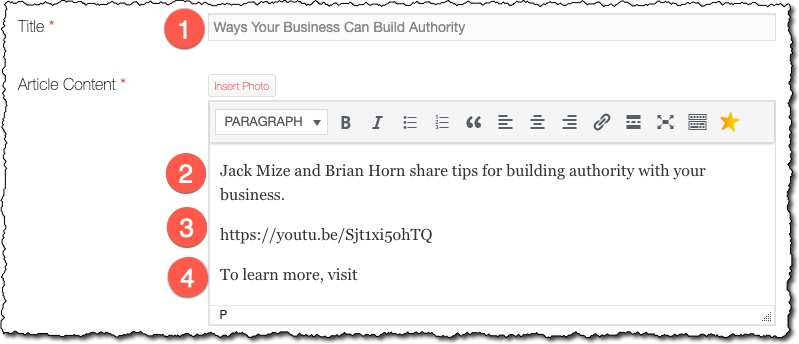
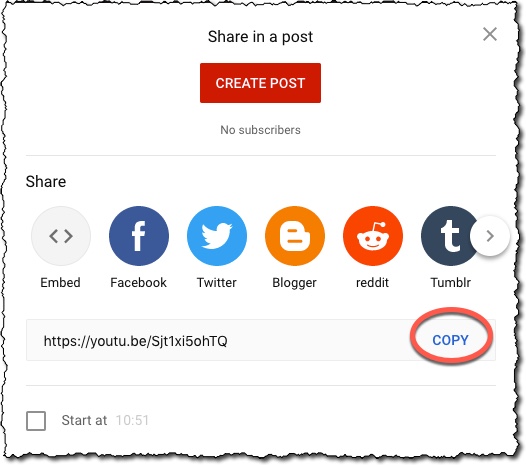
*To get the YouTube Share Link
1. Go to YouTube.com
2. Find the video you want to embed
3. Below the video, click on Share
4. From the Dialog box, click on “COPY” next to the URL

Other Details
1. Featured Image – Upload an image to appear as the thumbnail image for your interview.
2. Category – Select the most applicable category for this interview.
3. Sponsored Content – Include a sponsored image and link if desired.
4. Click Submit
5. You may Edit the content of your Article/Interview at any time from your Contributor Dashboard.